Order-wide answers can stay at checkout. When items need different names, each name needs a verified link to its intended item, whether the questions appear during product configuration, in the cart or at checkout. Moving the question alone does not establish that link.
Start by writing the intended production result: which text belongs on which item, and in what quantity? Then verify that your WooCommerce setup preserves those associations through cart edits and into the saved order. Do not assume native WooCommerce or an unspecified extension supplies this behavior.
Build the two-name example
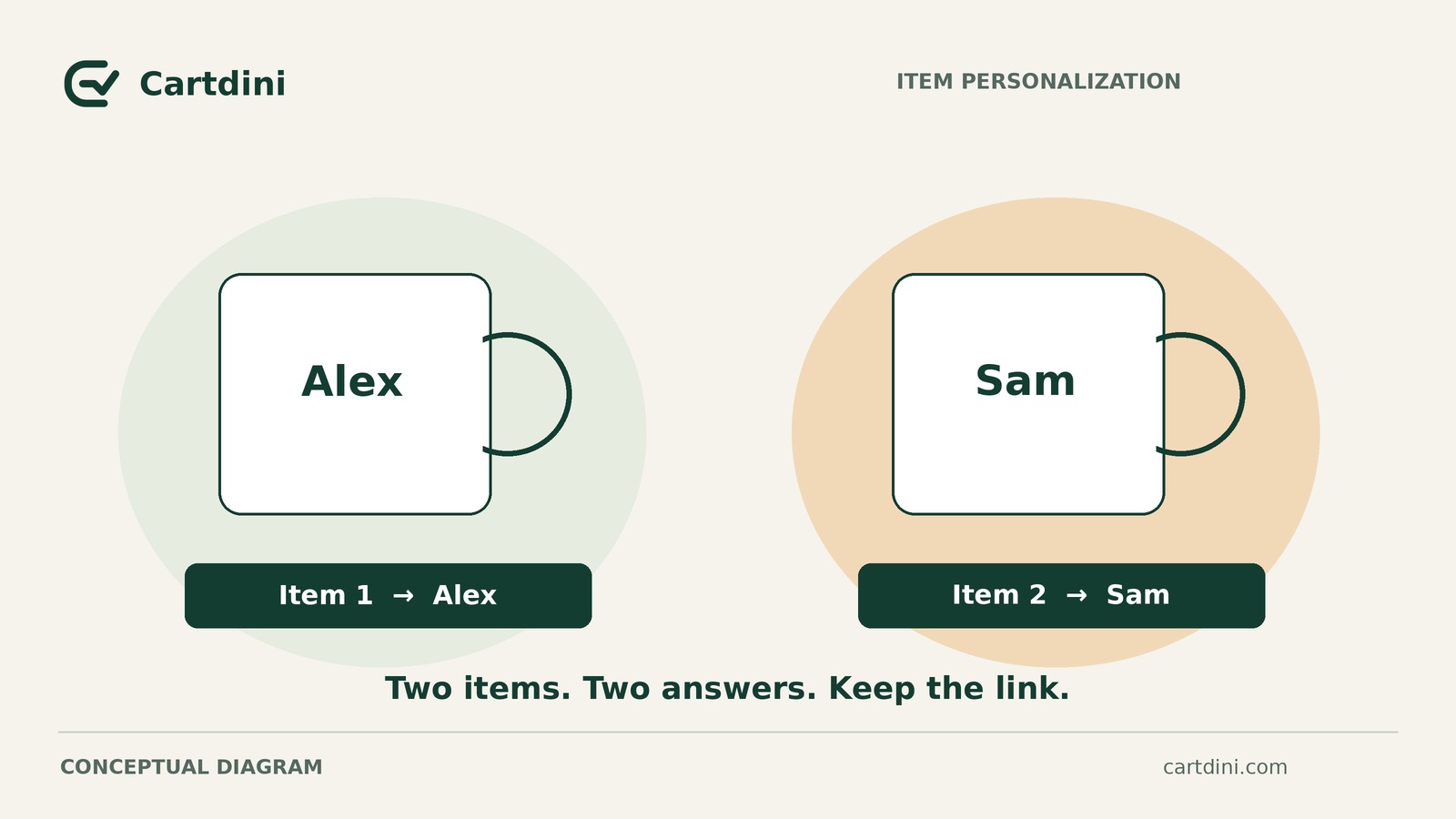
Consider a hypothetical store selling personalized blue mugs. In this example, every personalized mug requires a name; blank mugs are not part of the offered service. A shopper wants two mugs:
- Planned unit A: one blue mug printed with “Alex.”
- Planned unit B: one blue mug printed with “Sam.”
Suppose the proposed cart initially represents these as one product line with quantity two. An answer such as “Blue mug: Alex, Sam” identifies the product, but leaves an important question unanswered: if the quantity drops to one, which name remains?
The information must distinguish the two intended items. That does not necessarily require separate unit records inside a quantity-two line. Two separately configured quantity-one lines could also represent Alex and Sam, provided testing confirms that they remain distinct and preserve their personalization.
Neither structure is assumed to be available automatically. “Unit A” and “unit B” are planning labels, not identifiers claimed to exist in your store.
Match the answer to its scope
Classify each question before deciding where to display it:
- Order-wide: one answer applies to the purchase as a whole. A greeting-card message could fit here if the service provides one card per order.
- Line-level: one answer applies to every unit on a particular cart line. This could suit an inscription intentionally repeated across all units, with that choice clear to the shopper.
- Unit-level: individual units can have different answers. The Alex-and-Sam order needs this level of information, however the implementation represents it.
Keep an order-wide greeting separate from the text that determines how each mug is made. A general “Special instructions” box should not have to carry both meanings.
Question placement and answer association are different decisions. Checkout can suit the whole-order message. Personalization belongs wherever the verified workflow lets shoppers enter and review the correct text beside the intended item and quantity. An ambiguous box does not become item-specific merely because it moves to a product page.
Write a field brief before choosing tools
Use the hypothetical mug order as a completed example, then replace its details with your service requirements:
- Purpose and scope: collect the exact name to print on each personalized mug, separately from general order requests.
- Customer-facing labels: show “Blue mug — unit A — name to print” with Alex, and “Blue mug — unit B — name to print” with Sam, or equally clear labels suited to the chosen workflow.
- Association requirement: keep the selected product or variation, exact name and intended quantity together, including after cart edits.
- Completeness and production limits: require a name for every personalized mug in this service. Document applicable production limits and make them visible beside the question.
- Edit policy: new units need their own confirmed names; shoppers must be able to identify which personalized item they remove. Removed names must not become instructions for another active item. Re-added mugs start with empty names in this proposed workflow.
- Review and saved output: shoppers and staff must be able to distinguish one Alex mug from one Sam mug. After edits, the saved order must show the revised text-to-quantity mapping.
Clear labels help shoppers, but product names and screen positions alone do not prove that answers stay attached after an edit.
For each requirement, record verified, failed or unverified, alongside the staging observation. Required personalization in this example does not justify making unrelated checkout questions mandatory.
Test edited carts through to saved orders
Use synthetic data on staging. Before submitting orders, confirm that tests cannot trigger live charges, messages to real customers or production jobs. If those effects cannot be isolated, arrange safe testing first.
These outcomes are requirements to verify, not reported behavior. Start each edit test from a fresh Alex-and-Sam cart. Inspect saved item information in the working view staff would actually use; seeing both names somewhere on an order is insufficient.
If the mapping fails, verify a different workflow
If any required test fails or remains unverified, do not offer the proposed multi-name flow. Resolve the association or cart-edit limitation, then retest.
A one-personalized-unit-per-order restriction is only a candidate fallback. It removes multi-unit ambiguity, but does not establish that names are required, saved correctly or cleared after removal.
Before offering that restricted route, adapt the brief and verify the restriction itself, including attempts to add another personalized item on a separate line. Repeat the applicable tests for required names, name edits, removal and re-addition, and saved item information. Confirm that the final order associates the exact name with the intended product and quantity one. A notice asking shoppers to order separately is not enforcement.
Use the restricted route only after those checks pass. If they fail or remain unverified, pause that personalization workflow rather than relying on staff to guess.
For the two-name workflow, first test reducing the order to one mug while keeping Sam. Check both the shopper’s choice and the saved order: there should be exactly one Sam mug and no active Alex production instruction.