CARTDINI FREE · CLASSIC & BLOCKS
Add a purchase-order number field to WooCommerce
Collect a buyer’s purchase reference as a checkout answer and keep it with the order. Use a Free Text question for identifiers such as PO-2048 or 00042.
Get Cartdini Free Set up the referenceCartdini documentation · Product guidance reviewed . Public Free 1.8.16; separately supplied Pro 1.8.15. Recorded examples retain their tested versions and dates. This content review is not a new runtime test.
A reference field is not a purchase-order payment gateway
This setup records a value the buyer supplies. It does not issue a purchase order, validate an external PO, approve credit, create payment terms, generate an invoice or change the available gateways. If you need those operations, use a system designed for them alongside an independently tested checkout setup.
| Requirement | Cartdini approach |
|---|---|
| Always offer a reference box | Free Text field, optional or required. |
| Ask only after a business-purchase answer | Pro condition using an earlier field in the same location. |
| Require a reference only for eligible shoppers | Pro conditional requirement with supported context; review guest and signed-in states. |
| Export references from selected orders | Pro’s bounded order-answer CSV tools. |
Create the reference field
Use Text, not Number.
In WooCommerce → Cartdini → Extra questions, add a Text question called Purchase reference or Purchase order number. References can contain letters, punctuation and leading zeros; they are identifiers rather than quantities.
Choose Order information.
A purchase-specific reference normally belongs to this order, rather than to reusable contact or address details. Set the stable key before saving.
Set useful instructions.
Explain when the reference is needed and where it will be used. An example placeholder such as PO-2048 is guidance, not a submitted default or a validation rule. Set a sensible maximum length and decide whether an empty answer should be allowed.
Save and inspect the checkout.
Choose Save questions & fields. Check the actual Classic or Blocks checkout on staging, including the mobile layout and the location of the question.
Free validates supported required/length rules; it does not offer an arbitrary PO-format regex or query the buyer’s procurement system. For a conditional requirement, see the business-reference example.
Verify the exact identifier survives
Use fictional references with different shapes, such as PO-2048 and 00042, in separate test orders if both formats matter to your store. Verify the saved answer rather than inferring success from the thank-you screen alone. Test a missing answer if the field is required, and a too-long answer when you set a limit.
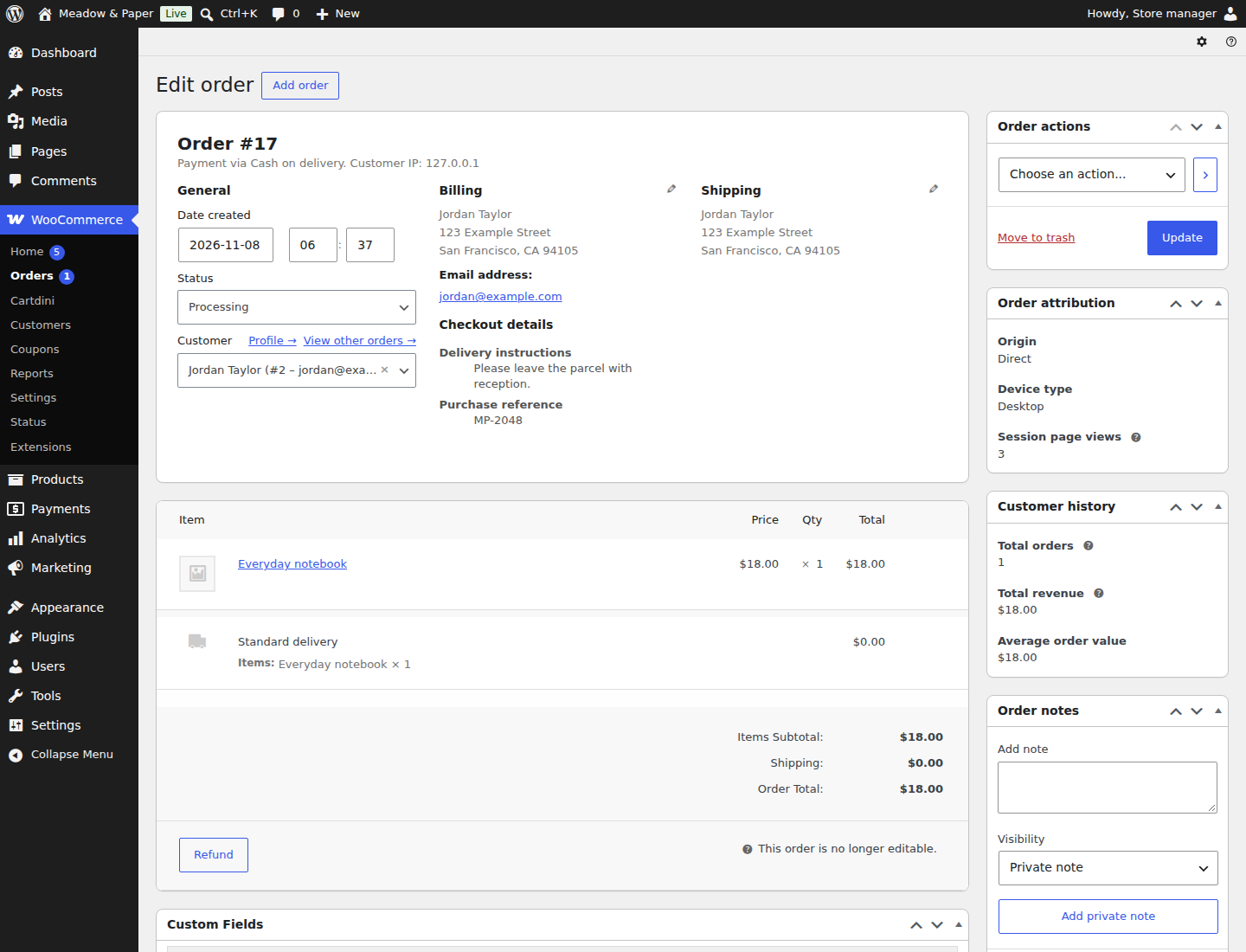
Select supported admin/customer order and email display destinations according to your process. Hiding a destination does not delete its stored value. Existing orders are historical snapshots; adding a field does not invent references for earlier orders.
Make the reference useful to your team
Free can show it with supported order details and emails. With Pro, an administrator can select up to three personal Orders-list answer columns or export selected questions from up to 100 placed orders. A downloaded CSV is not an accounting-system synchronization.
Do not put secrets, card details or unnecessary personal information in a purchase-reference field. Document who uses the reference and how long your store retains it. Review the answer-export workflow before sharing files outside your store.
Related setup
Validate checkout answers · Conditional fields and requirements · Complete Free walkthrough