CARTDINI PRO · PRACTICAL GUIDE
Limit the dates shoppers can request at checkout
Use Cartdini Pro to collect a preferred date with lead time, allowed weekdays and excluded dates. These are rules for an answer—not delivery slots, appointments or capacity reservations.
Follow the steps Compare Free & ProCartdini documentation · Content reviewed for Free 1.8.2 and Pro 1.8.2. Recorded examples identify their tested setup.
Before you start
Use a staging store with Cartdini Free 1.8.2 and Pro 1.8.2 active. Activate your Pro licence through its supported setup screen to unlock editing and tools. Keep Free active. Check your checkout type and compatibility requirements.
Use fictional answers and a test or offline payment method for verification. Review every draft before choosing Save questions & fields; a recipe does not publish itself.
Choose the dates your team can consider
Add a standalone Date question.
In Extra questions, choose the Date answer type and a useful label such as Preferred delivery date. Be clear that it is a request if fulfilment is not guaranteed. Set required or optional to suit your process.
Open Date availability.
Enable Limit available dates. Choose Minimum calendar days from today, available weekdays and unavailable dates. Our example uses two calendar days of lead time, Monday through Friday and one specific excluded date.
Check the store timezone and fixed bounds.
The rule uses the WordPress store timezone. Two calendar days includes weekends; it does not mean two working days. An Earliest value can make the minimum later, and Latest still applies. Avoid a combination that leaves no valid dates.
Review and save.
Enter excluded dates as YYYY-MM-DD, one per line, then save the question configuration. Recheck the visible help text in the actual checkout.
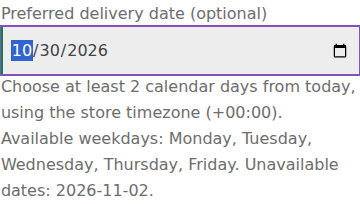
See the actual date rules
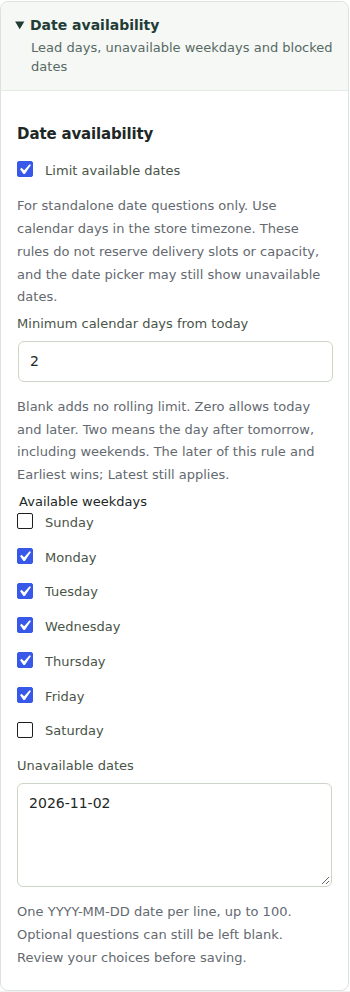
Test valid and invalid requests
- A date before the rolling minimum must be rejected.
- A disallowed weekday and an explicitly excluded date must be rejected.
- A permitted date within all bounds must be accepted and saved with the order.
- An optional date can be left blank. A required date cannot.
- Test near midnight in your store timezone and in each checkout type you use.

Know what the rule does
Lead time accepts 0–365 calendar days and up to 100 excluded dates. At least one weekday must remain available. The server validates the submitted answer; a native browser date picker may still display unavailable dates and then explain the rejection.
These advanced rules apply to standalone Date questions. Repeatable-group child dates retain simpler validation. Cartdini does not reserve stock, delivery capacity or appointment slots, and it does not select a shipping method.
How this example was checked
Checked on 28 October 2026 in an isolated fictional store using the public Cartdini Free + Pro 1.8.2 packages, WordPress 7.1.3, WooCommerce 11.2.1, PHP 8.5.4 and Storefront 4.6.2. Settings were saved through Cartdini’s native configuration API; the pictured controls were inspected and the illustrated scenarios were exercised through Classic checkout. The checklists also include store-specific checks for you to perform. Orders used an offline test method, with outgoing email and external requests blocked. No real payment or customer data was used.
The fresh server-validation check rejected the too-early, weekend and excluded samples, and accepted the permitted date and optional blank. The permitted date also completed the illustrated Classic offline checkout.